Good fishing charter website design helps someone choose a trip, understand the cost and take a clear next step. The website should explain what the experience involves before asking for a booking.
For an operator reviewing a charter boat website, the practical question is: can a first-time visitor work out whether this trip suits their group, then book or enquire without avoidable confusion?
Fishing charter website design: five essential jobs
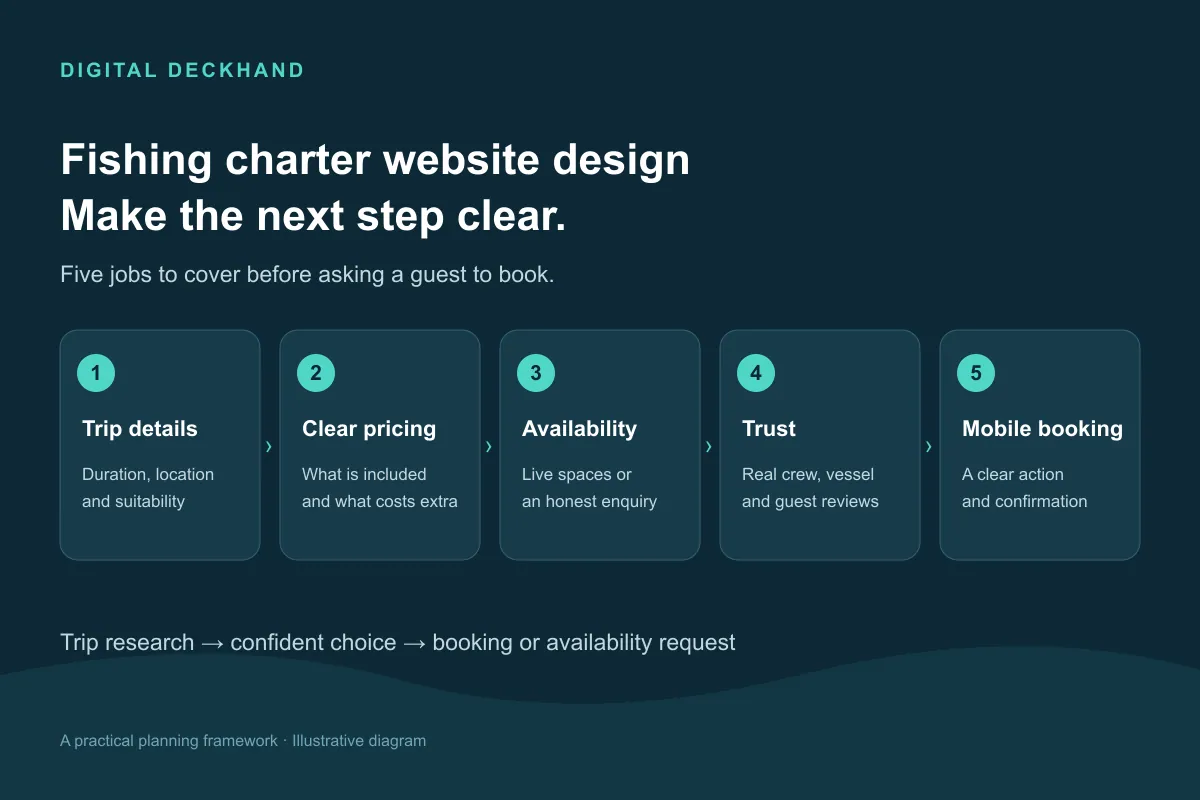
Build the site around five jobs:
- Explain the trips: who each option suits, how long it lasts and where it departs.
- Make the cost clear: show the pricing basis, inclusions and any additional charges.
- Give a clear booking route: offer accurate availability or an enquiry process with an explicit next step.
- Establish trust: introduce the skipper, show the boat and provide genuine customer feedback.
- Work on a phone: make trip details, directions and booking controls easy to use.
Use these fishing charter website design priorities as the brief for a new site or a review of your current one. For broader planning, see our marine web design guide.
Trip pages that answer practical questions
In fishing charter website design, give each meaningfully different trip its own page. A short introductory outing and a full-day specialist charter need different explanations, even when they use the same boat.
Start with a useful summary: trip type, duration, departure harbour, private or shared format, group capacity and price basis. Then explain who the trip is suitable for and what guests should expect.
Answer questions such as:
- Is previous fishing experience needed?
- Can beginners or children join, and under what conditions?
- What fishing methods and target species does the trip focus on?
- What facilities are available aboard?
- Where should guests meet, and when should they arrive?
- What arrangements should someone discuss before booking?
Describe target species without promising catches. State any suitability restrictions accurately rather than using a broad claim such as “suitable for everyone”.
Keep the main facts near the top, with further detail below. A visitor should not need to read a long account of the business before finding the departure point.
Clear pricing, inclusions and what to bring
Explain whether the displayed price is per person, per boat or for a private group. Where a starting price is necessary, make its conditions visible: which trip it covers, the included group size and what changes the total.
Place inclusions beside the price. Specify whether tackle, bait, equipment hire, refreshments or other items are included, where applicable. Clearly identify optional extras and anything guests must arrange themselves.
Keep preparation information practical. Tell guests what clothing, footwear, food or personal items your operation recommends. Distinguish between what you provide and what they need to bring.
Before asking someone to pay, explain the actual deposit, balance-payment, cancellation and weather arrangements. Summarise the key points near the booking controls and link to the complete terms.
If a trip needs a bespoke quote, explain which details you need to prepare it. “Enquire for a private group quote” gives visitors more direction than an unexplained “Contact us”.
Availability: online booking or an enquiry form?
Good fishing charter website design reflects how the operation manages its diary. Choose the booking method around the trips you sell and the availability you can maintain accurately.
Use online booking for clearly defined trips
Online booking is worth considering when customers can select a defined trip, date and group size without a conversation first.
Before choosing a system, check how it handles private charters, shared spaces, deposits, schedule changes and bookings taken by phone. Ask who updates availability and how conflicting bookings will be prevented.
Carry the selected trip into the booking process where possible. Show the total and payment requirements before checkout, then explain whether the customer has a confirmed booking or a request awaiting acceptance.
Use enquiries when a conversation is needed
An enquiry form can suit tailored itineraries or arrangements that require the skipper’s input. Ask for the trip, preferred date, group size and contact details, with space for relevant questions.
Label the action accurately. “Request availability” sets a different expectation from “Book now”. After submission, confirm receipt and explain what happens next. Only state a response time your team can maintain.
A site can support both routes. Keep their labels and confirmation messages distinct.
Booking journey: trip page → trip, date and group size → confirmed booking or availability request → clear confirmation and next steps.
Trust in fishing charter website design
Put genuine reviews near the trip information and booking decision. Useful feedback might discuss the skipper’s communication, support for beginners or the experience aboard. Preserve the customer’s meaning and identify the review source.
Introduce the skipper and crew with real photographs and relevant background. Show the actual vessel, fishing space and facilities so visitors can judge whether the setup suits their group.
Only publish qualifications, memberships, insurance statements or awards that you can substantiate and keep current. A badge without an explanation gives visitors little context.
Provide a working telephone number and an obvious way to ask questions before paying. Explain where guests board, including any difference between the office address and meeting point. Make that distinction visible on the website and in booking communications.
Local search: your profile and departure locations
Make the departure location clear in page titles, headings and trip descriptions where it helps the reader. Write naturally about the harbour and area you genuinely operate from.
For an eligible Google Business Profile, keep business details complete and accurate, including contact information and relevant opening hours. Google identifies relevance, distance and how well known a business is as factors in local results; completing a profile does not guarantee a position. See Google’s guidance on improving local visibility.
Create separate location pages when you have genuinely different departure points or services to explain. Give each page useful details: the trips available there, boarding instructions, parking information and directions.
Avoid copying one page and swapping town names. A page aimed at visitors staying nearby should explain the actual departure harbour and journey involved, without implying that you operate from their town.
Keep location details consistent across trip pages, contact information and booking confirmations.
Fishing charter website design for mobile visitors
Review the whole booking journey on a phone, including any external booking system. Check whether visitors can read trip details, select dates, correct form errors and complete payment without awkward zooming or controls disappearing off-screen.
Use photographs to answer questions. Show the boat layout, fishing positions, seating, facilities and boarding point where relevant. Include representative trip images alongside catch photographs.
Prepare images for their display size and compress them before uploading. Ask the developer to review image loading, booking widgets and other scripts when investigating slow pages.
Test on a mobile connection as well as office Wi-Fi. Check whether a booking button appears promptly and whether large banners obscure useful information.
For each photograph, write concise alternative text where it adds meaning. Describe what the image shows rather than repeating search phrases.
Common mistakes to check for
Use this fishing charter website design checklist to review your own site:
- One vague page covering several very different trips.
- A price with no explanation of what it buys.
- A “Book now” button that opens a general contact form.
- An availability calendar nobody owns or updates.
- Important weather or cancellation information buried away.
- A gallery dominated by catches, with little view of the boat.
- Different departure instructions on different pages.
When comparing charter website examples, follow the journey through to booking. Look for clear decisions, useful information and accurate confirmations, alongside the visual design.
Frequently asked questions
Does a fishing charter website need online booking?
Not every operation needs it. Defined trips with manageable availability may suit online booking. Bespoke charters may need an enquiry first. Choose the route you can maintain and explain clearly whether the customer is booking or requesting availability.
What should appear first on a trip page?
Show the trip type, departure point, duration, suitability, pricing basis and next step. Follow with fuller information about the experience, inclusions, preparation and terms. Make the page useful to someone unfamiliar with your operation.
Can a small charter business use a one-page website?
A focused page can be a starting point for fishing charter website design with one straightforward offer. Check that it still covers trip details, pricing, trust, departure information and booking. Consider separate pages when trips require substantially different explanations.
Should prices be public if private charters vary?
Explain the pricing basis and what affects a quote. Publish accurate rates where possible. If a quote is necessary, tell visitors what information to submit and what the next step involves. Avoid a headline price that leaves essential conditions unexplained.
How Digital Deckhand can help
Digital Deckhand is a marine-specialist, data-driven agency working with businesses including fishing-charter operators. Our web design and development service focuses on mobile-first, SEO-friendly websites built around enquiries and sales.
Depending on the agreed scope, a project can include strategy, copy, design, development, integrations, content direction, launch and SEO support. We also offer marine SEO and analytics-led conversion rate optimisation. Each engagement is bespoke.
If your website needs a clearer route from trip research to booking, book a discovery call about your charter website.